GSTBill: GST Invoice & Billing App
Self-hosted GST billing for Indian freelancers, agencies and small shops. Create GST tax invoices and quotations, collect payments by UPI QR, share on WhatsApp and email, and export the reports your CA needs for GSTR-1 and GSTR-3B.
Thank you for buying GSTBill. This guide covers installing the app on your server, setting up your business, and using every feature. If something here doesn't answer your question, see Support.
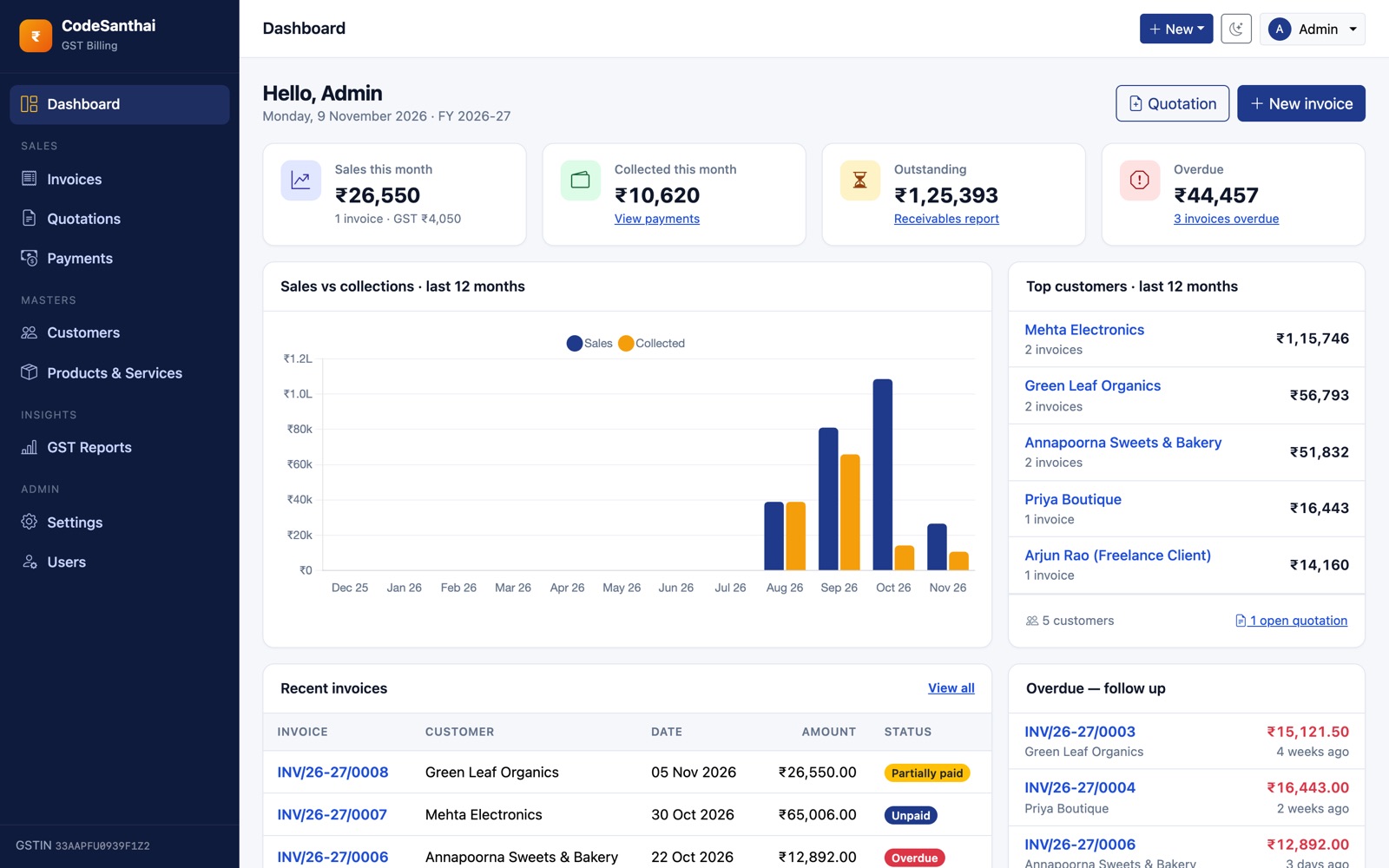
Main features
GST invoicing
- GSTIN, HSN/SAC, place of supply, reverse charge
- Automatic CGST + SGST or IGST
- Line discounts, round-off, amount in words (lakh/crore)
- HSN-wise tax summary on the invoice
- Bill of Supply for unregistered / composition sellers
- Financial-year numbering:
INV/26-27/0001
Getting paid
- UPI QR for the exact balance due
- Signed customer link with Pay, PDF and Print
- WhatsApp share with your own message
- Email with the PDF attached
- Partial payments: UPI, cash, bank, card, cheque
GST reports (CSV)
- Sales register
- GST summary: B2B, B2C Large, B2C Small
- HSN/SAC summary (GSTR-1 Table 12)
- Outstanding & ageing
Everything else
- Quotations with one-click convert to invoice
- Admin and Staff users
- Logo, signature, accent colour, A4/A5/Letter
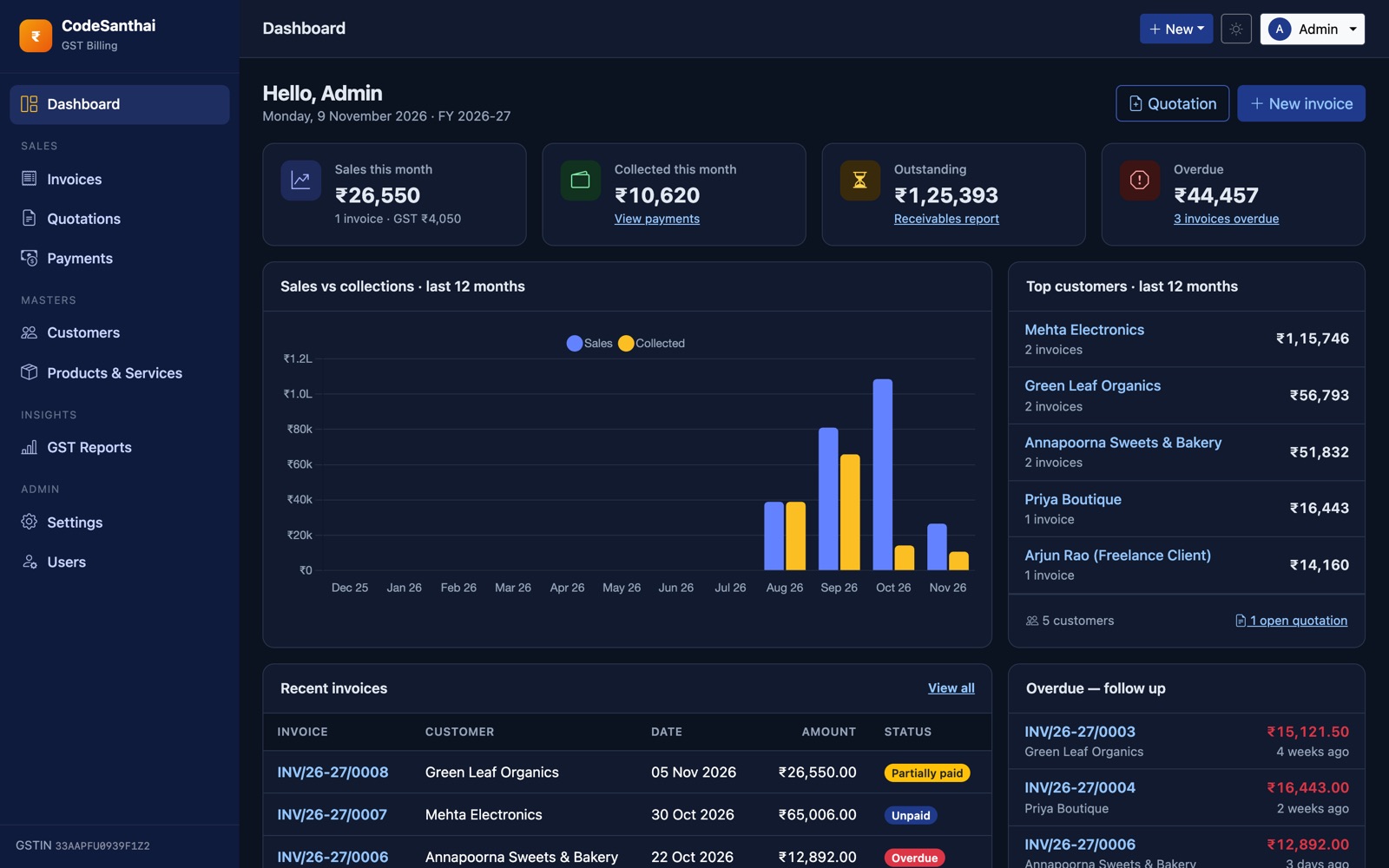
- Dark mode, works on mobile
- 3-step web installer, no terminal needed
Server requirements
Most Indian cPanel hosts (Hostinger, BigRock, MilesWeb, HostGator India and others) meet these out of the box. The installer checks them for you.
| Item | Required |
|---|---|
| PHP | 8.3 or newer |
| PHP extensions | pdo_mysql (or pdo_sqlite), mbstring, openssl, tokenizer, xml, ctype, fileinfo, gd (UPI QR and images in PDFs), dom (PDFs) |
| Database | MySQL 5.7+ or MariaDB 10.3+ (SQLite 3 also works for a single user) |
| Web server | Apache with mod_rewrite, or Nginx |
| HTTPS | Strongly recommended, so customer links open securely |
No Node.js, npm or build step is needed. All CSS and JavaScript are already in the download, and the app loads nothing from outside CDNs.
What's in the download
gstbill-v1.0.0.zip
├── README.md
├── LICENSE.txt
├── CHANGELOG.md
├── docs/
│   ├── documentation/index.html   ← this guide
│   └── installation.md
└── src/                           ← the application (upload this)
    ├── app/  bootstrap/  config/  database/  resources/  routes/  storage/
    ├── public/                    ← the web root (document root points here)
    └── vendor/                    ← PHP packages, already installed
The vendor/ folder is included, so you do not need Composer or SSH on shared hosting.
Installation on cPanel / shared hosting
About 10 minutes. You need cPanel access and nothing else.
- Create a MySQL database. In cPanel → MySQL® Databases, create a database (e.g.
user_gstbill), create a user with a strong password, then add the user to the database with All Privileges. Write down the database name, username and password. - Upload the files. In cPanel → File Manager, upload the contents of
src/into a new folder outsidepublic_html, for example/home/USER/gstbill. Uploading the zip and using Extract is fastest. - Point a domain at
public/. In cPanel → Domains (or Subdomains), create e.g.billing.yourdomain.comand set its document root to/home/USER/gstbill/public.Must you use
public_htmldirectly? Upload everything intopublic_html. The included root.htaccesssends every request topublic/, so.env,vendor/andstorage/can't be opened from a browser. A separate document root (above) is still the safer option. - Select PHP 8.3+. cPanel → MultiPHP Manager → choose PHP 8.3 or newer for the domain. In Select PHP Version → Extensions, make sure
gd,pdo_mysql,mbstring,fileinfoanddomare ticked. - Set folder permissions.
storage/,bootstrap/cache/andpublic/uploads/→ 775. The project folder must be writable so the installer can create.env(755 or 775). - Run the web installer. Open your domain. You are taken to
/installautomatically.
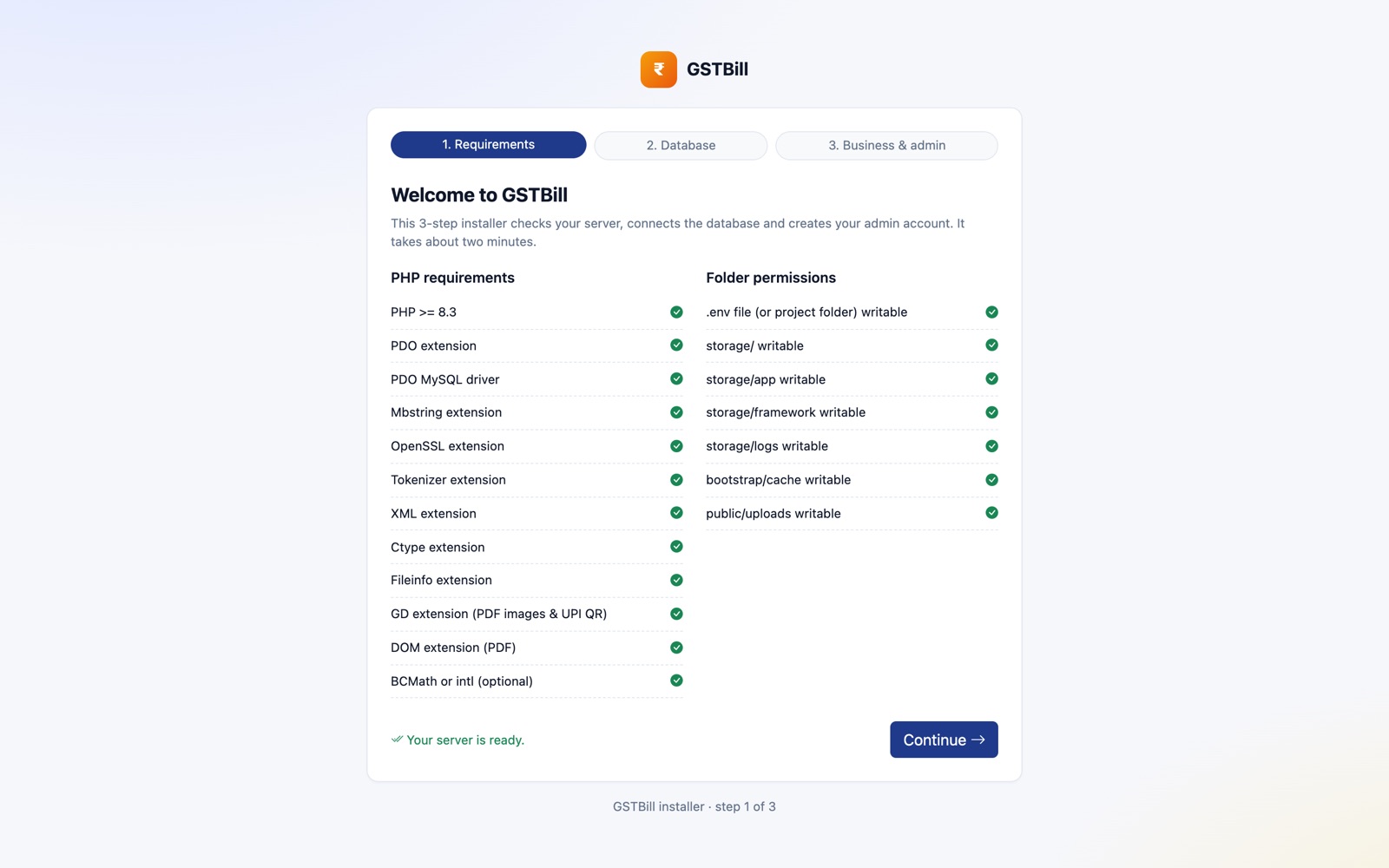
Installer step 1: Requirements
Every line should have a green tick. If one is red, fix it (usually a PHP extension or a folder permission) and reload the page.
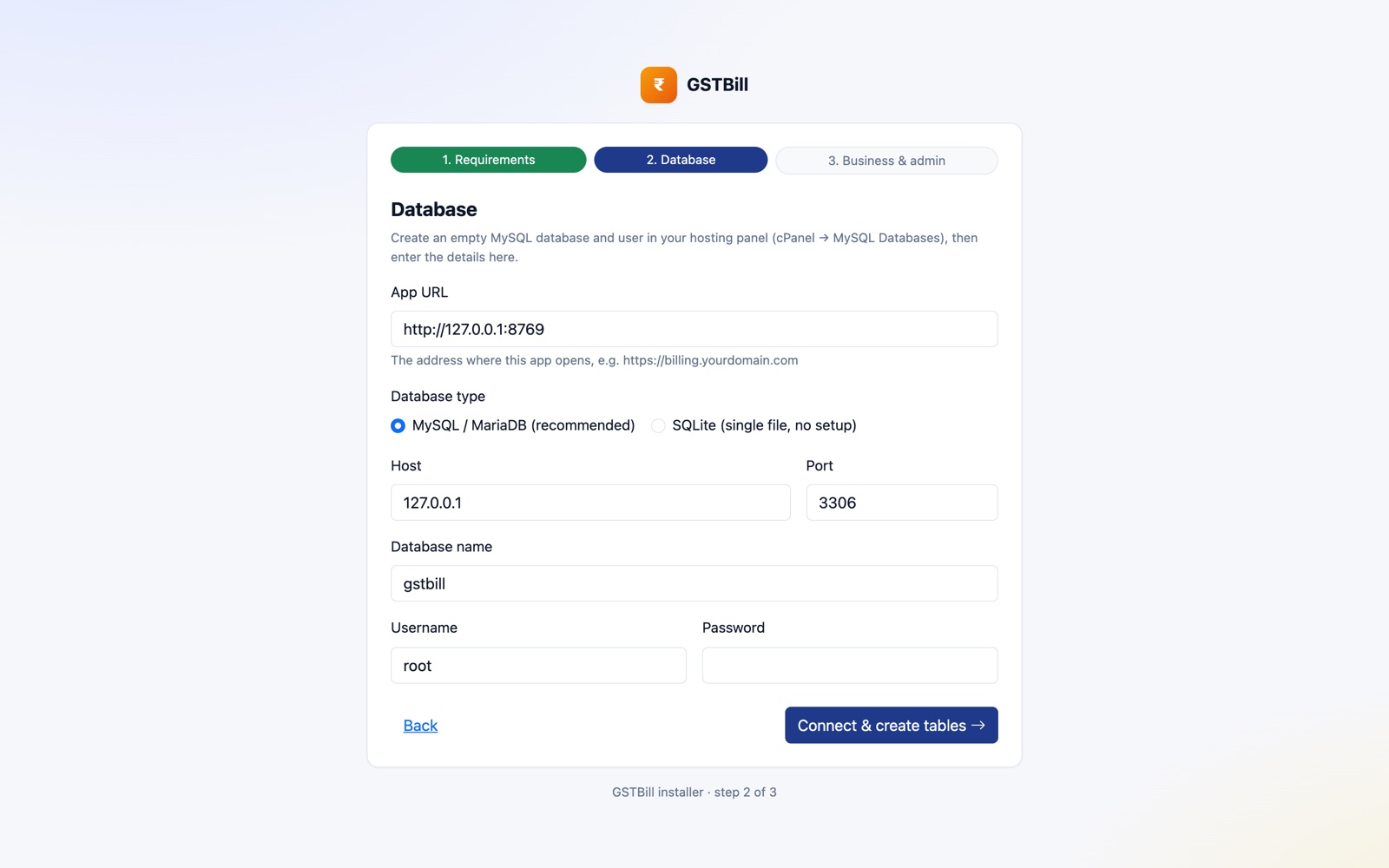
Installer step 2: Database
Enter the App URL (your address, with https://) and the database details from step 1. The host is usually localhost and the port 3306. The installer tests the connection, writes .env, creates the tables, and switches the app to production mode with debug turned off.
Installer step 3: Business & admin
Enter your business name, GSTIN (your state is picked up from it automatically), and the admin email and password you will log in with. Tick Add sample customers, products and invoices so I can explore if you want to explore with demo customers and invoices first.
When the installer finishes it locks itself. Visiting /install again just takes you to the app.
- Turn on SSL. cPanel → SSL/TLS Status → Run AutoSSL. Then make sure
APP_URLin.envstarts withhttps://. - Log in and continue with After installing.
Installation on a VPS (Ubuntu + Nginx)
sudo apt install -y nginx mysql-server php8.3-fpm \
  php8.3-{mysql,mbstring,xml,gd,curl,zip,bcmath,intl} unzip
sudo mysql -e "CREATE DATABASE gstbill CHARACTER SET utf8mb4;
  CREATE USER 'gstbill'@'localhost' IDENTIFIED BY 'CHANGE_ME';
  GRANT ALL ON gstbill.* TO 'gstbill'@'localhost';"

sudo mkdir -p /var/www/gstbill && cd /var/www/gstbill
# copy the contents of src/ here, then:
cp .env.example .env
nano .env                    # set APP_URL and the DB_ values
php artisan key:generate --force
php artisan app:install      # asks for business + admin details (add --demo for sample data)
php artisan config:cache && php artisan route:cache && php artisan view:cache
sudo chown -R www-data:www-data storage bootstrap/cache public/uploads
Nginx server block:
server {
    listen 80;
    server_name billing.example.com;
    root /var/www/gstbill/public;
    index index.php;
    client_max_body_size 8M;

    location / { try_files $uri $uri/ /index.php?$query_string; }
    location ~ \.php$ {
        include snippets/fastcgi-php.conf;
        fastcgi_pass unix:/run/php/php8.3-fpm.sock;
    }
    location ~ /\.(?!well-known) { deny all; }
}
Then run sudo certbot --nginx -d billing.example.com for HTTPS.
Running on your own computer
Useful for trying the app or customising it. You need PHP 8.3+, Composer and MySQL (for example via Homebrew, XAMPP or Laragon).
cd gstbill
cp .env.example .env
# edit .env: DB_DATABASE, DB_USERNAME, DB_PASSWORD
# create the database first, e.g.  mysql -uroot -e "CREATE DATABASE gstbill"
composer install
php artisan key:generate --force
php artisan migrate --seed      # tables + demo data
php artisan serve               # open http://127.0.0.1:8000
Demo logins created by --seed: admin@example.com / password and staff@example.com / password.
For the quickest start without MySQL, set DB_CONNECTION=sqlite, delete the other DB_ lines, and run touch database/database.sqlite before migrating.
Run the automated tests with php artisan test.
After installing: 5-minute setup
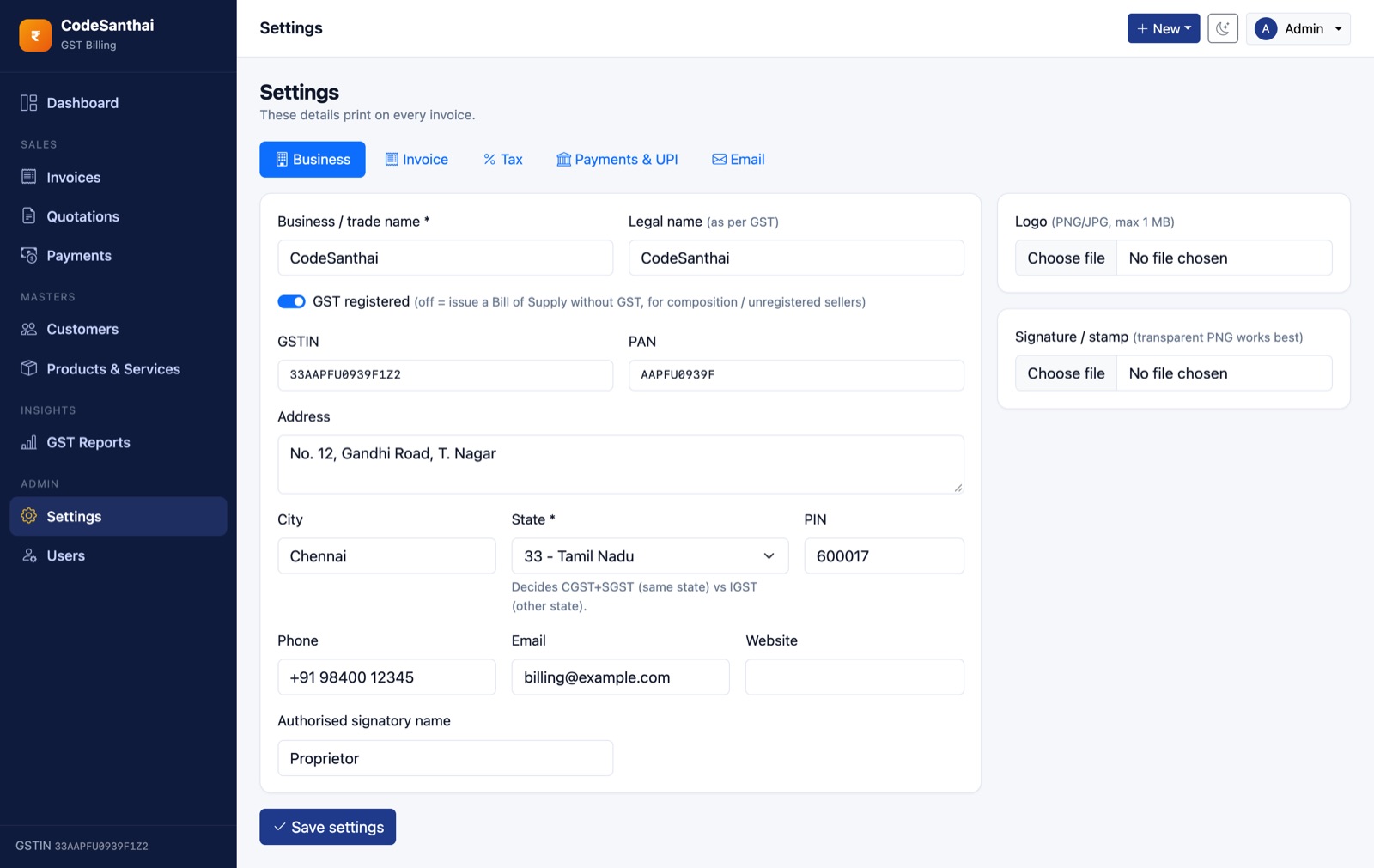
Open Settings (admin only) and work through the tabs. Your invoices use these details.
| Tab | What to fill in |
|---|---|
| Business | Address, PIN, phone, email, logo, signature/stamp, authorised signatory |
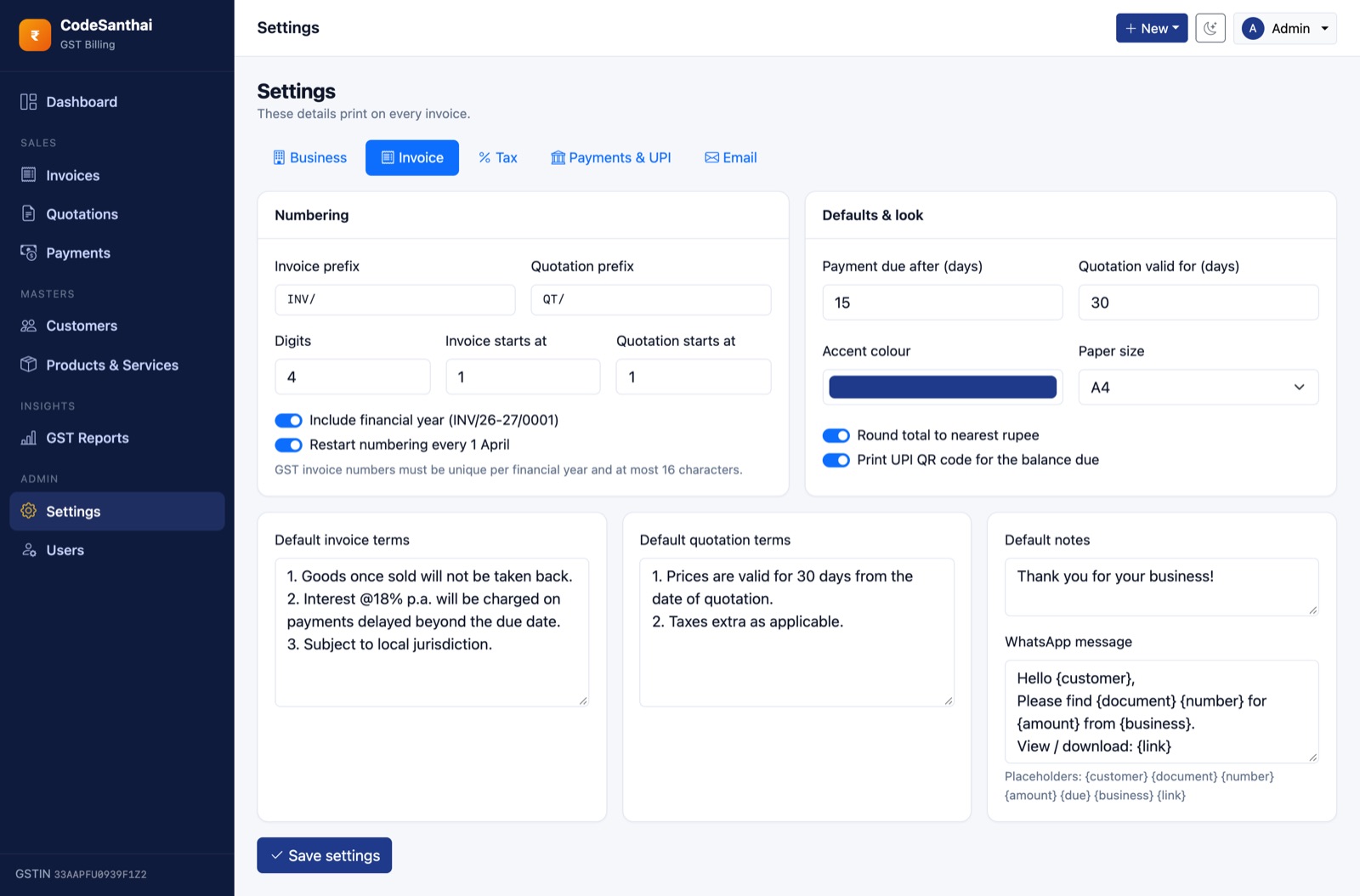
| Invoice | Number prefix and starting number, due days, terms, notes, accent colour, paper size, WhatsApp message |
| Tax | The GST rates you use, the default rate, whether HSN/SAC is mandatory |
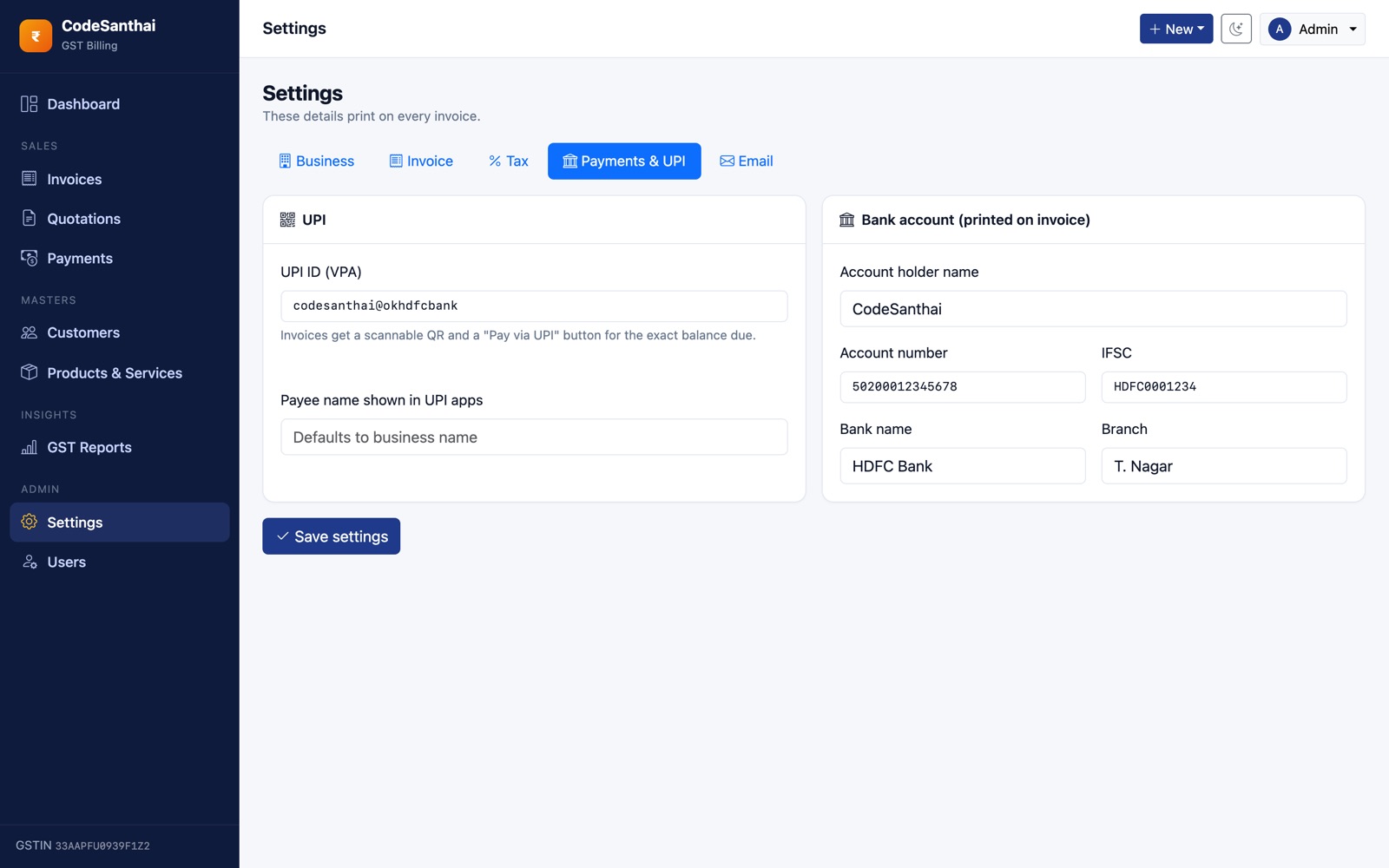
| Payments & UPI | Your UPI ID (for the QR code) and bank details for the invoice footer |
| SMTP details, then press Send test |
Moving from another billing tool mid-year? In Settings → Invoice, set Invoice starts at to your next number (e.g. 128) so your numbering continues without a gap.
Then add your customers and products, or add them as you go from the invoice form.
Dashboard
The home page shows this month's sales and GST, money collected this month, total outstanding, overdue amount, a 12-month sales vs collections chart, top customers, recent invoices and an overdue follow-up list. Click any figure to open the matching list or report.
Customers
Customers → Add customer. Enter the GSTIN for business (B2B) customers. GSTBill checks the 15-character format and the check digit, and sets the customer's state from the first two digits. Leave GSTIN empty for consumers (B2C) and choose their state.
The customer's state becomes the default place of supply on new invoices, which decides CGST+SGST vs IGST. Each customer page shows total billed, paid and outstanding, plus their invoices and quotations.
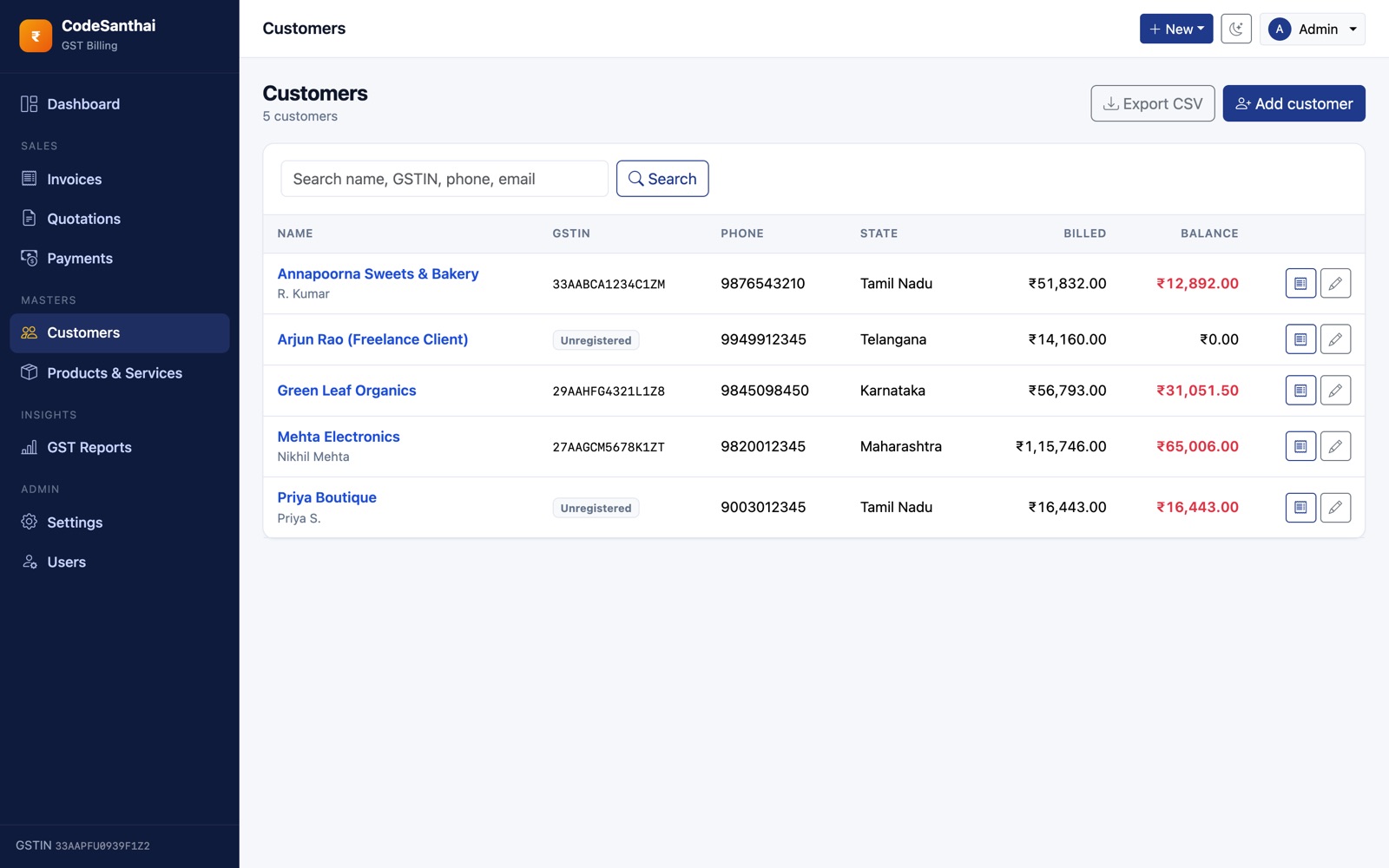
Each invoice keeps a copy of the customer's details from when it was created. Editing a customer later doesn't change invoices already issued, as GST rules require.
Products & services
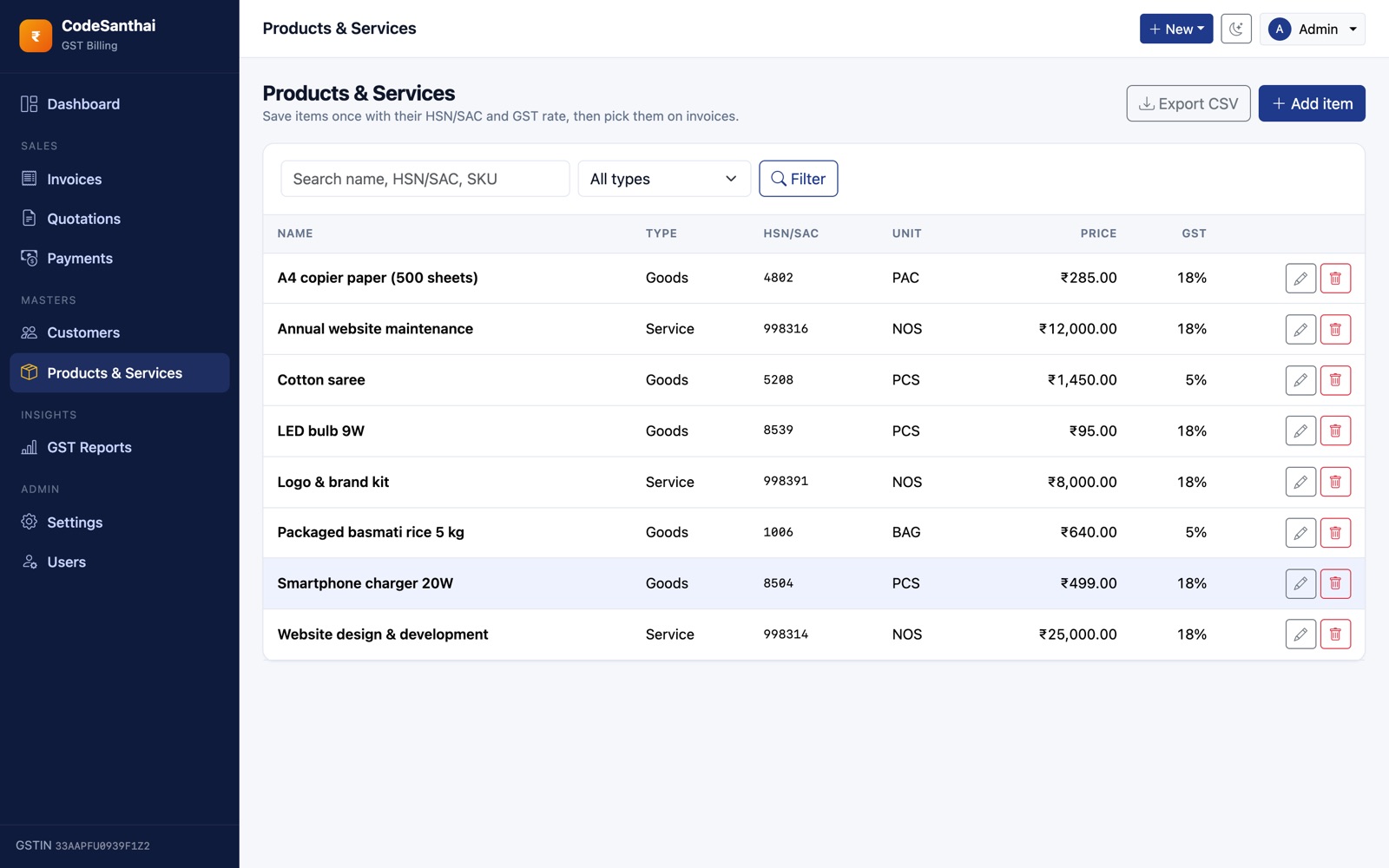
Save items you bill often with their HSN (goods) or SAC (services) code, unit (UQC such as NOS, KGS, BAG), price and GST rate. On the invoice form, picking a product fills the whole line. You can still change any value on that invoice.
Invoices
Creating an invoice
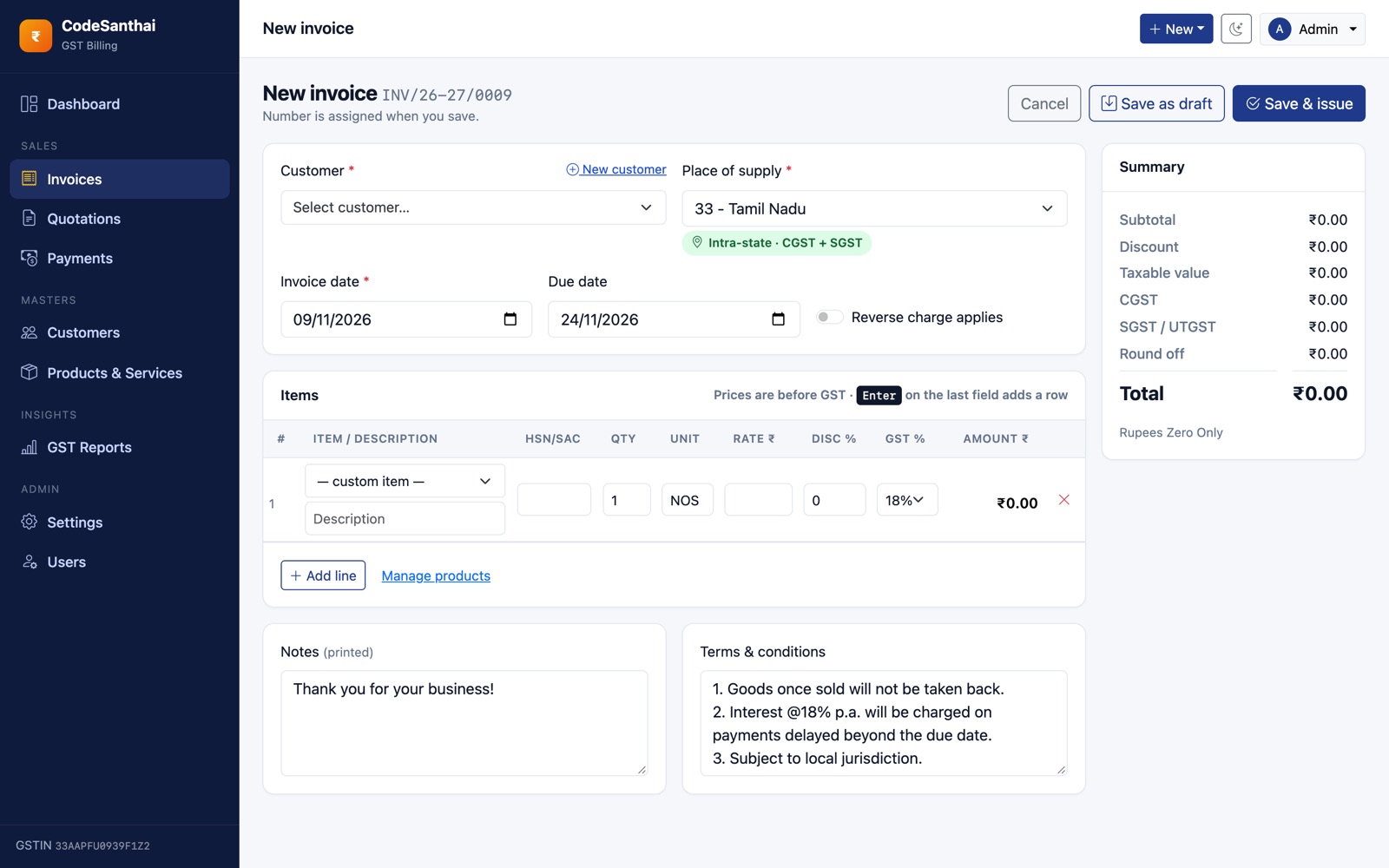
- Invoices → New invoice. Choose the customer (or click New customer to add one without leaving the page).
- Check the place of supply. The green badge shows whether it is Intra-state · CGST + SGST or Inter-state · IGST.
- Add lines: pick a product or type a description, then quantity, rate, discount % and GST %. Press Enter on the last field to add another row.
- The summary on the right updates as you type, including round-off and the amount in words.
- Click Save & issue, or Save as draft to finish later.
Invoice page
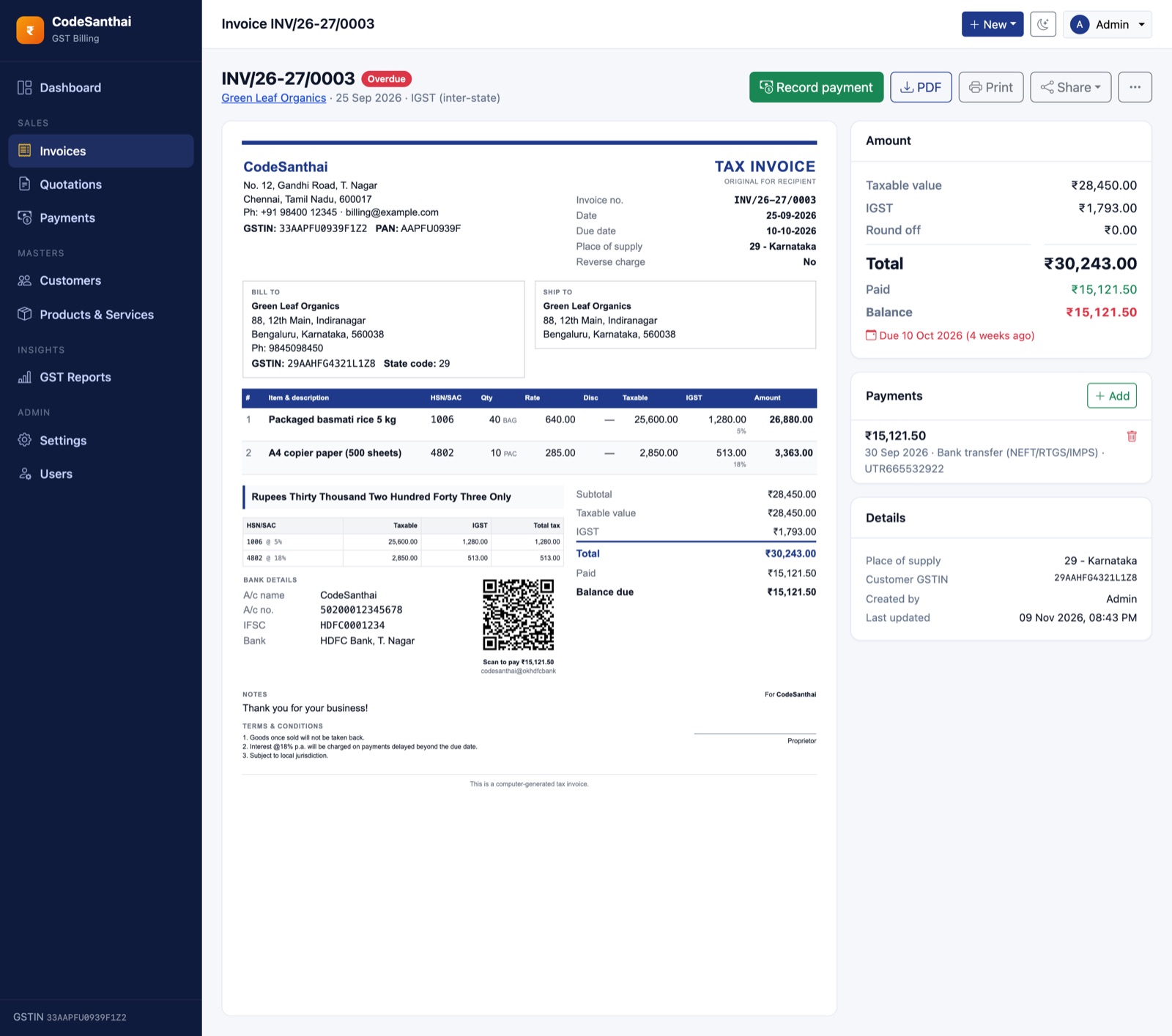
The invoice page shows the invoice exactly as it prints, with buttons to Record payment, download the PDF, Print, and Share (WhatsApp, email, copy link). The ⋯ menu has Edit, Duplicate and Cancel.
Statuses
| Status | Meaning |
|---|---|
| Draft | Not issued yet. Not counted in reports. Can't take payments. |
| Unpaid | Issued, nothing received yet. |
| Partially paid | Some payments recorded, balance remaining. |
| Paid | Fully paid. |
| Overdue | Shown automatically when the due date has passed and a balance remains. |
| Cancelled | Kept in your records with its number, but left out of sales and GST reports. |
Editing, duplicating and cancelling
- Edit keeps the same invoice number. An invoice with payments can't be edited. Delete its payments first, or duplicate it.
- Duplicate creates a new draft with the same customer and lines, useful for monthly retainers.
- Cancel (admin only) is the correct way to void an issued invoice. Don't delete it, so your number series has no gaps.
Numbering
Numbers look like INV/26-27/0001: prefix, financial year, then a running number. The series restarts every 1 April. All of this can be changed in Settings → Invoice.
Bill of Supply
If your business is not GST registered (Settings → Business → GST registered off), documents print as Bill of Supply with no tax lines, as the law requires for unregistered and composition sellers.
How GST is calculated
- Taxable value per line = quantity × rate − discount.
- If the place of supply is the same state as your business, the GST is split equally into CGST and SGST/UTGST. Otherwise the full rate is charged as IGST.
- Tax is rounded to the paisa per line. The grand total is rounded to the nearest rupee when Round total is on, and the round-off is shown separately.
- The HSN/SAC summary on the invoice groups taxable value and tax by code and rate.
- The default GST rates are the slabs in force from 22 Sept 2025: 0, 0.25, 3, 5, 18 and 40%. Edit the list in Settings → Tax.
GSTBill helps you prepare GST documents and reports. Always confirm rates, HSN codes and return figures with your tax professional.
Quotations
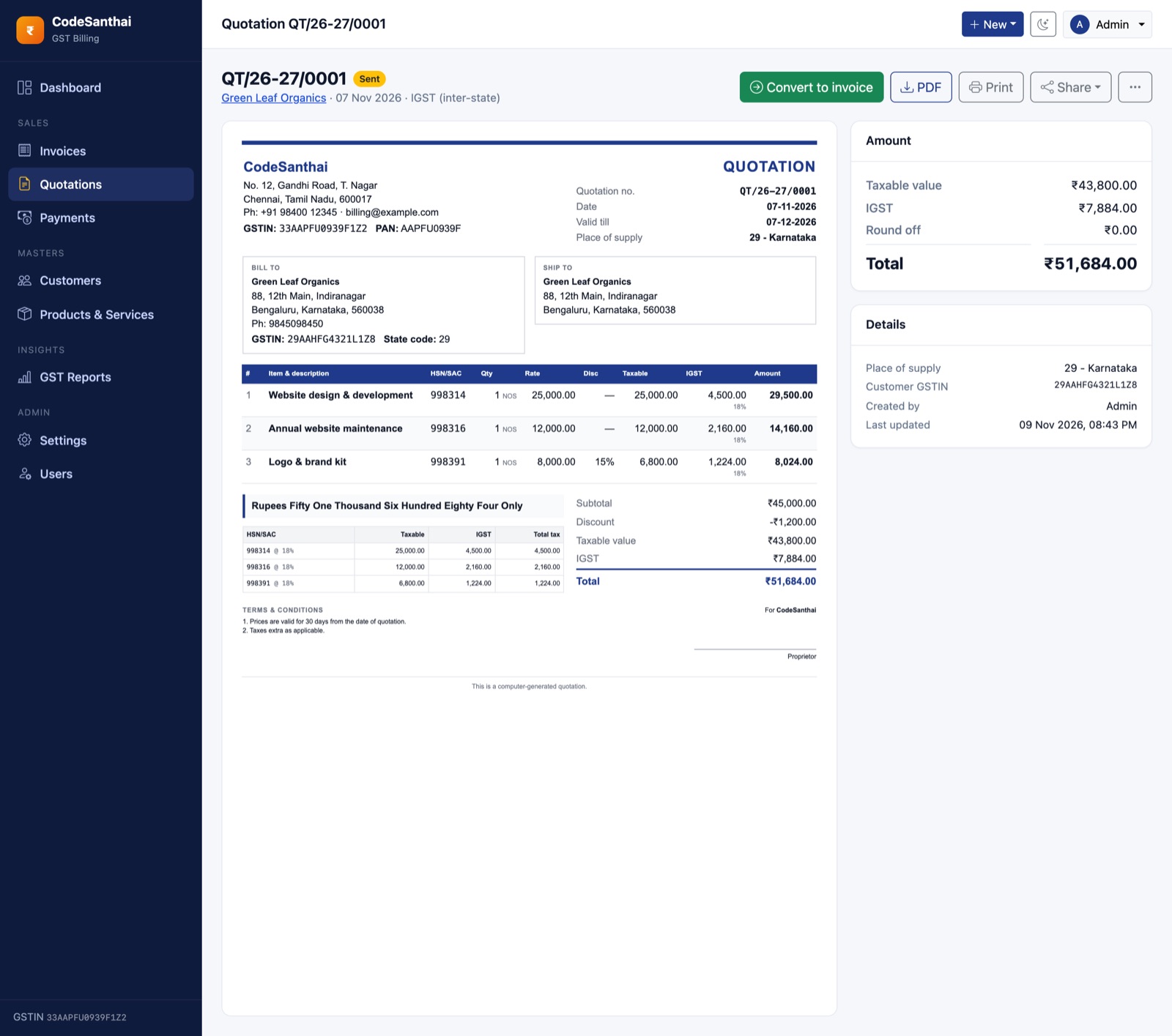
Quotations (estimates) work like invoices, with their own numbering (QT/26-27/0001) and statuses: Draft, Sent, Accepted, Declined and Converted. Emailing a draft quotation marks it Sent automatically.
When the customer agrees, open the quotation and click Convert to invoice. A tax invoice is created with the same lines, and the quotation links to it.
Payments
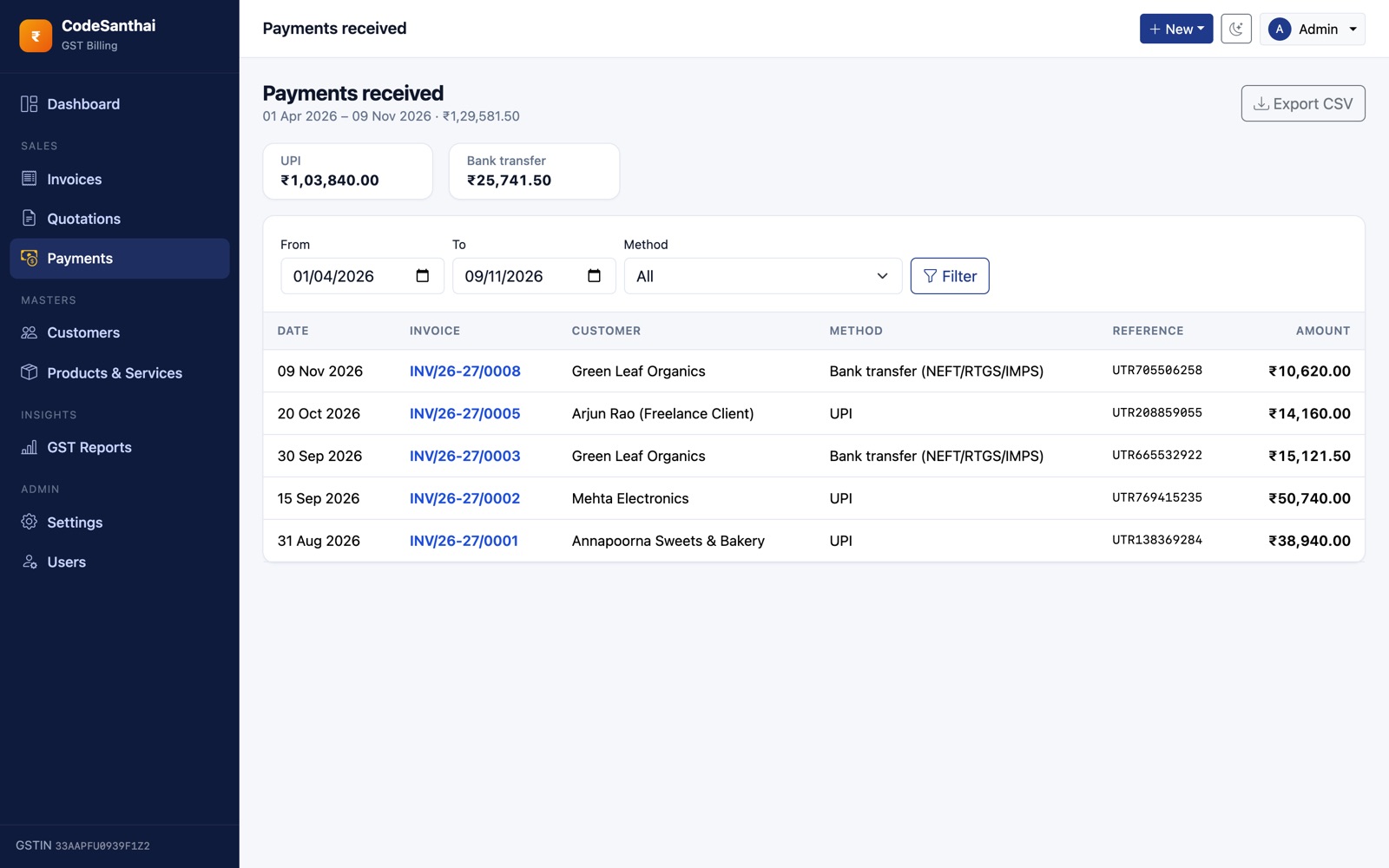
On an issued invoice, click Record payment. Enter the date, amount, method (UPI, cash, bank transfer, card, cheque or other) and an optional reference or UTR number. Partial payments are fine. The app won't accept more than the balance due.
The Payments page lists all receipts with filters by date and method, totals by method, and CSV export. Admins can delete a wrongly entered payment, and the invoice balance updates automatically.
Sharing invoices & getting paid
Customer link
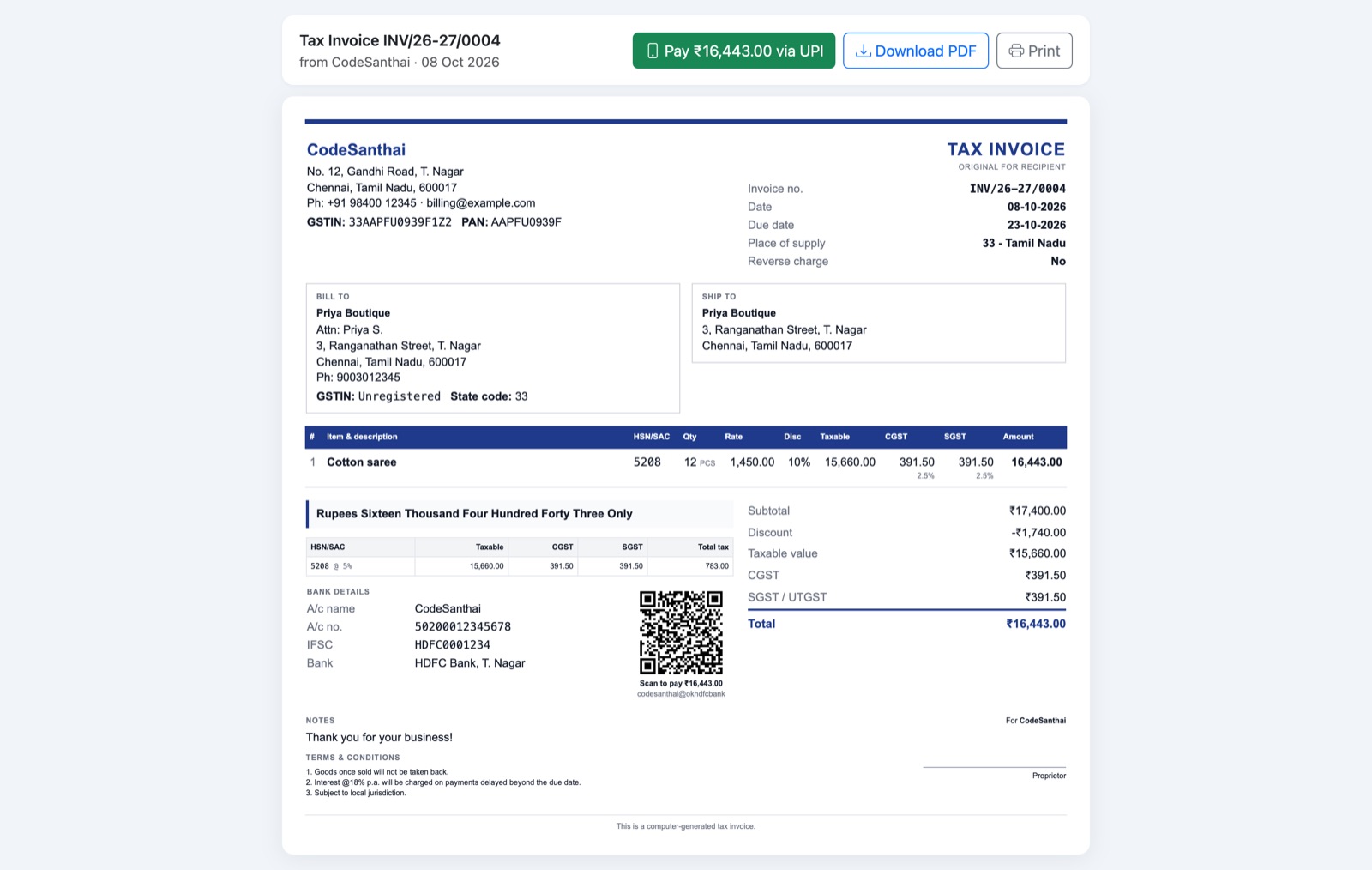
Every invoice has a secure, signed link. Your customer can open it without logging in to view the invoice, Pay via UPI (opens their UPI app with the amount filled in on mobile), download the PDF or print. Changing even one character of the link makes it stop working.
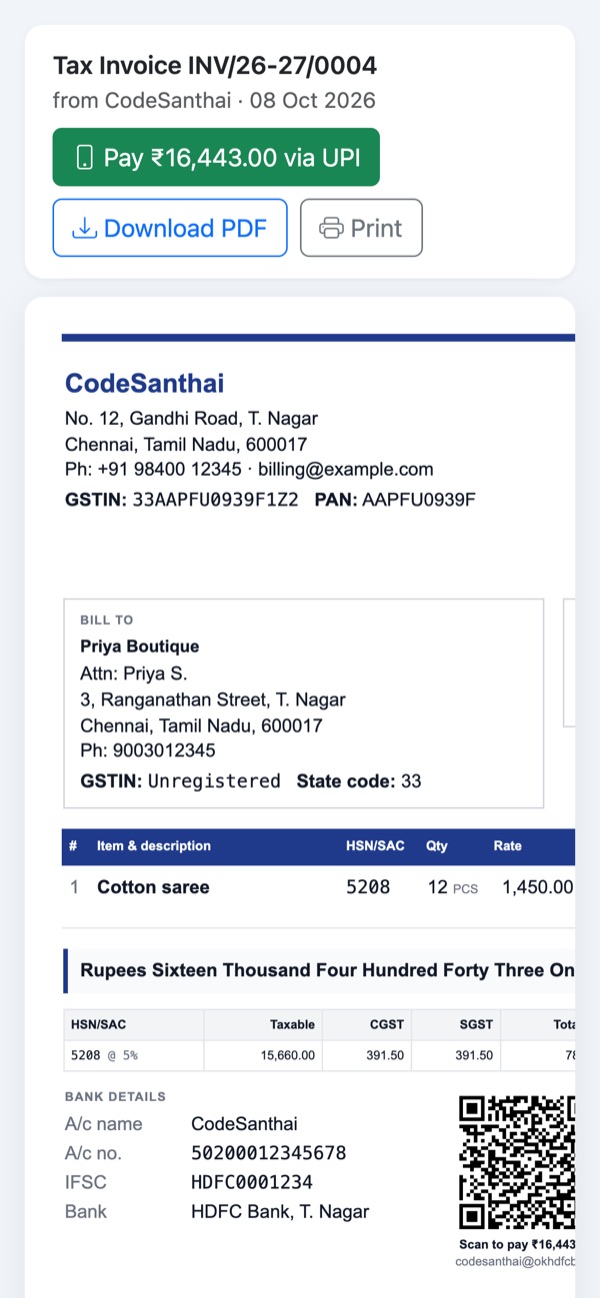
Share → WhatsApp opens WhatsApp with your message and the link filled in. Edit the message in Settings → Invoice. These placeholders are replaced automatically:
{customer} {document} {number} {amount} {business} {link}
Share → Email sends the invoice with the PDF attached, using the SMTP details in Settings → Email.
UPI QR code
When a UPI ID is set and Print UPI QR is on, every invoice with a balance due shows a QR for exactly that balance. Customers scan it with any UPI app (GPay, PhonePe, Paytm, BHIM). The QR disappears once the invoice is fully paid.
GST reports
Open GST Reports and choose a period: this or last month, this or last quarter, this or last financial year, or a custom range. Every report has Export CSV and print buttons. Drafts and cancelled invoices are always left out.
| Report | What it shows | Use it for |
|---|---|---|
| Sales register | Every invoice with taxable value, CGST, SGST, IGST, total and paid | Books of account, reconciliation |
| GST summary | B2B, B2C Large and B2C Small totals, rate-wise tax, B2C state-wise, B2B invoice list | GSTR-1 tables 4, 5 and 7; GSTR-3B table 3.1 |
| HSN/SAC summary | Quantity, taxable value and tax grouped by HSN/SAC and rate | GSTR-1 table 12 |
| Outstanding & ageing | Unpaid balances by invoice and by customer: not due, 1–30, 31–60, 61–90, 90+ days | Following up on payments |
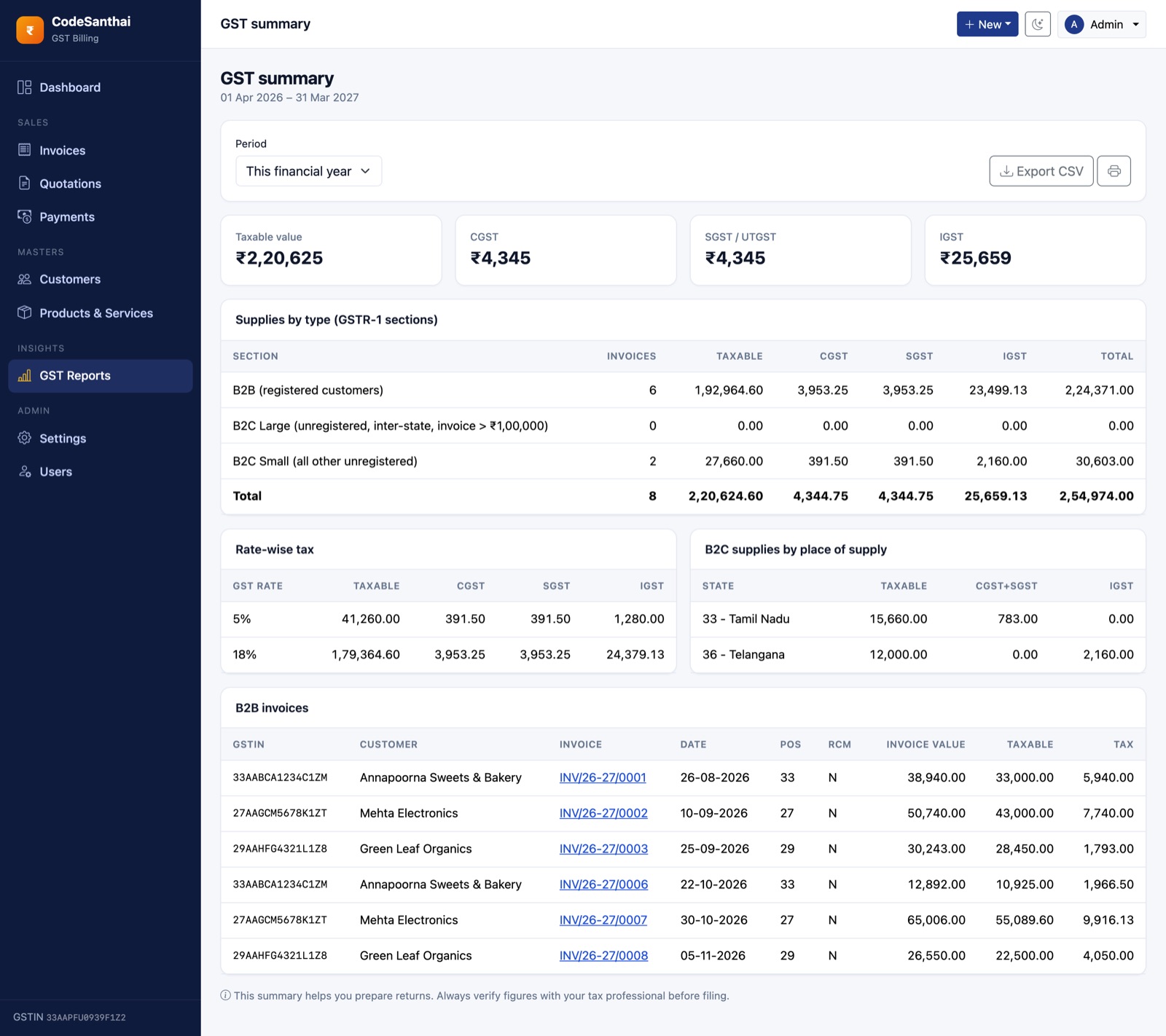
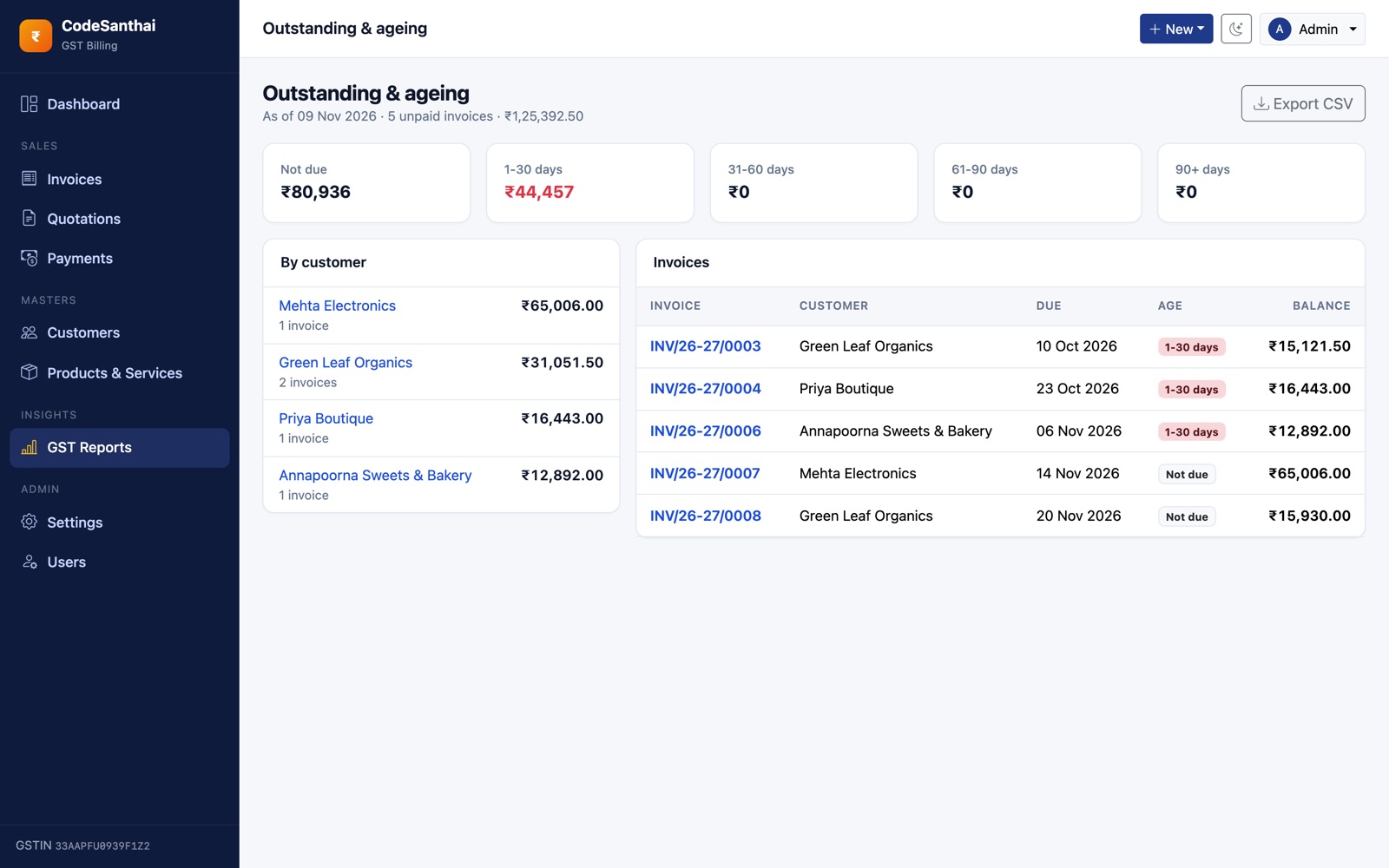
B2C Large means inter-state invoices to unregistered buyers where the invoice value is above the threshold set in Settings → Tax (default ₹1,00,000).
Users & roles
| Action | Admin | Staff |
|---|---|---|
| Invoices, quotations, customers, products, payments, reports | ✔ | ✔ |
| Cancel invoices, delete payments | ✔ | — |
| Settings | ✔ | — |
| Add, edit and deactivate users | ✔ | — |
Add users in Users. A deactivated user can't log in, but their past work stays. Everyone can change their own name, email and password from the menu under their name (top right).
Settings reference
Business
Business/trade name, legal name, GST registered, GSTIN, PAN, address, city, state, PIN, phone, email, website, authorised signatory name, logo (PNG/JPG/WebP, up to 1 MB) and signature or stamp image (up to 512 KB).
Invoice
Invoice and quotation prefixes, number of digits, starting numbers, include financial year, restart every 1 April, payment due days, quotation validity, accent colour, paper size (A4/A5/Letter), round-off, print UPI QR, default terms and notes, and the WhatsApp message.
Tax
The GST rates offered on invoice lines, the default rate for new lines, the B2C Large threshold, and whether HSN/SAC is mandatory on every line.
Payments & UPI
UPI ID (VPA), payee name shown in UPI apps, and bank account name, number, IFSC, bank and branch printed on invoices.
SMTP host, port, username, password, encryption, from address and from name. Use Send a test email to check them. For Gmail: host smtp.gmail.com, port 587, TLS, and a Google App Password (not your normal password).
Updating to a new version
- Back up your database, your
.envfile and thepublic/uploads/folder. - Upload the new
src/files over the old ones. Don't overwrite.env,storage/orpublic/uploads/. - Run
php artisan migrate --force(cPanel → Terminal, or SSH). - Clear caches:
php artisan optimize:clear.
Download new versions from My downloads on codesanthai.tech.
Backups
Your data lives in two places. Back up both regularly:
- The MySQL database holds all customers, products, invoices, payments, users and settings. Use cPanel → Backup, or
mysqldump gstbill > backup.sql. - The
public/uploads/folder holds your logo and signature images.
Keep a copy of .env too. It holds your app key and database password.
Running a public demo
To show GSTBill to your own clients on a public URL, use demo mode. Never turn it on for a real business installation.
- Install normally with sample data (or run
php artisan migrate --seed). - In
.envsetDEMO_MODE=true, then runphp artisan config:clear. - Add one cron job (cPanel → Cron Jobs, every minute):
* * * * * cd /home/USER/gstbill && php artisan schedule:run >> /dev/null 2>&1
In demo mode:
- The login page shows the demo admin and staff logins as one-click buttons.
- A banner tells visitors the data resets every hour.
- Changing passwords, users or settings, and sending email, are blocked. Everything else works.
- Every hour all data is wiped and the sample data is loaded again, with dates relative to today. You can run it by hand with
php artisan app:demo-reset. The command refuses to run unlessDEMO_MODE=true.
Troubleshooting
| Problem | Fix |
|---|---|
| 500 error or blank page | Check storage/logs/laravel.log. Usually folder permissions or PHP below 8.3. To see the error on screen, briefly set APP_DEBUG=true in .env, then set it back to false. |
| "No application encryption key" | Make the project folder writable, or run php artisan key:generate --force. |
| 404 on every page except the home page | Apache mod_rewrite is off, or the document root isn't public/. |
| PDF shows boxes instead of ₹ | Make storage/ writable. The PDF engine caches fonts there. |
| UPI QR missing | Add a UPI ID in Settings → Payments & UPI, keep Print UPI QR on, and enable the PHP gd extension. The QR only shows while a balance is due. |
| Emails not sending | Settings → Email → Send test shows the exact error. Port 587 with TLS works on most hosts. |
| Installer appears again after installing | The file storage/app/installed was deleted. Create it again (any content). |
| Forgot the admin password | Use Forgot password on the login page (needs email set up), or over SSH:php artisan tinker → App\Models\User::where('email','you@x.com')->first()->update(['password'=>'newpass123']); |
| Customer link says "Invalid signature" | APP_URL in .env must match the address customers use, including https://. |
FAQ
Does it file my GST returns?
No. GSTBill prepares the figures and CSV files you or your CA need for GSTR-1 and GSTR-3B. Filing is done on the GST portal.
Does it generate e-invoices (IRN) or e-way bills?
Not in version 1.0. Businesses above the e-invoicing turnover limit must also report invoices to the IRP.
Can I run several businesses?
One installation is one business (one GSTIN). For a second business, install another copy with its own database. Check that your licence covers it.
Is my data sent anywhere?
No. Everything stays on your own server and database. The app doesn't call any outside service except the SMTP server you configure.
Can I change the invoice design?
Colours, logo, signature and paper size are in Settings. To change the layout itself, edit resources/views/invoices/_document.blade.php. The PDF, print view and customer page all use this one file.
Credits
GSTBill is built on these open-source projects. Their licences are respected and included in vendor/.
| Component | Used for | Licence |
|---|---|---|
| Laravel 13 | Application framework | MIT |
| Dompdf (via barryvdh/laravel-dompdf) | PDF invoices | LGPL-2.1 / MIT |
| chillerlan/php-qrcode | UPI QR codes | MIT / Apache-2.0 |
| Bootstrap 5.3 | User interface | MIT |
| Bootstrap Icons | Icons | MIT |
| Chart.js 4 | Dashboard chart | MIT |
| Tom Select 2 | Searchable dropdowns | Apache-2.0 |
| DejaVu Sans | PDF font with the ₹ symbol | Bitstream Vera / free licence |
Changelog
1.0.0 9 November 2026
First release: GST tax invoices and quotations, CGST/SGST/IGST, HSN summary, PDF with UPI QR, WhatsApp and email sharing, payments, GST reports with CSV export, admin and staff users, web installer, and demo mode with hourly reset.
Support & licence
Email gopinathsbc@gmail.com with your purchase code, your site address and a description or screenshot of the problem. Support covers installation help, bug fixes and questions about existing features. Custom changes are quoted separately.
Your rights are set by the licence you bought (Regular or Extended). See LICENSE.txt. In short: one business installation per licence, and the code may not be resold or shared.
© 2026 CodeSanthai. GSTBill v1.0.0 documentation.